


Background
Agencies that receive HDAP funding have specific data collection requirements that must be completed in Clarity HMIS. In addition to the HUD standard data collection, agencies are required to answer supplemental entry questions, complete placement assessments and enter services. The items below should be collected in HMIS for all clients active on or after July 1, 2020.
HDAP Project Types and Project Enrollment Determination:
Below is a table of HUD-defined HMIS Project Types and their corresponding HDAP-relevant activities are provided below to support with the selection of the appropriate project type for HDAP project setup.
HDAP agencies will enroll households in the project type based on the household's homeless status at project start and the agency's project availability.
| HMIS Project Type | HUD Client Eligibility Restrictions | HDAP Project Activities |
|
Permanent Housing (PH) - Rapid Re-housing (RRH)
RRH subtypes:
|
People experiencing homelessness at entry, including people at imminent risk of homelessness
|
|
|
Homelessness Prevention
|
People at-risk of homelessness
|
|
|
Emergency Shelter (ES): Entry/Exit (EE)
|
People experiencing
|
|
|
Supportive Services Only (SSO): Services Only
|
People experiencing homelessness at entry
|
|
HDAP Entry Questions
HDAP entry questions are answered in the enrollment screen at the time a client is enrolled in the project. These questions only need to be completed for adults or heads of households. If you have questions about the enrollment process, please review the Enrolling Clients in a Project article. In addition to the standard HUD fields, the questions below are also required.
- Sex listed on birth certificate
- Target population: CalWORKS
- Target population: Discharged from institution
- Target population: Diverted from jail/prison
- Target population: GA/GR
- Target population: Low income veteran
- Target population: Other low/no income
Assessment
Below is the assessment that should be collected in HMIS for HDAP. All assessments should be entered under the Head of Household.
-
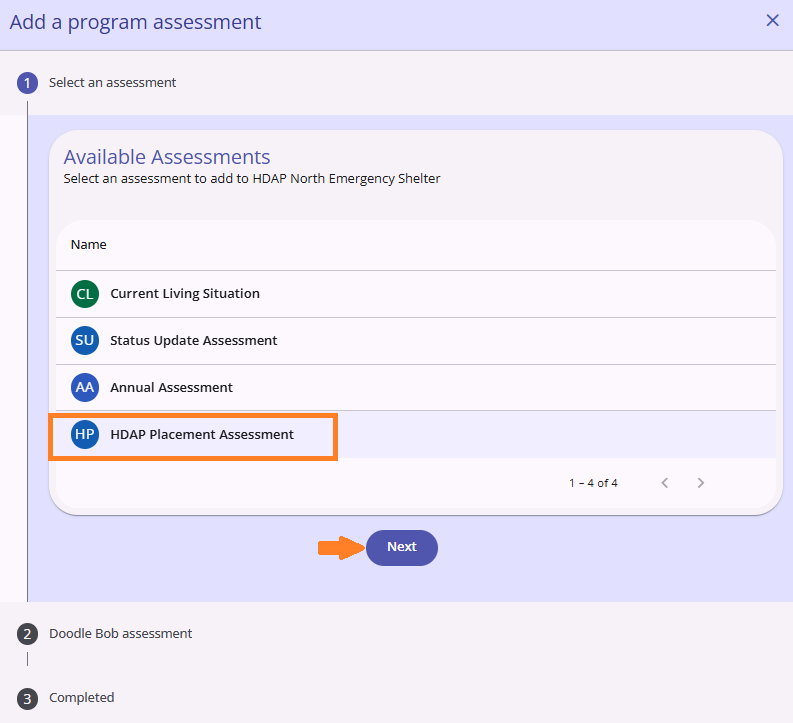
HDAP: Placement Assessment - This assessment should be completed each time a housing placement occurs, and allows the user to collect the date of the assessment, the type of placement, and the start and end date of the housing placement.
To access these assessments, follow the steps below.
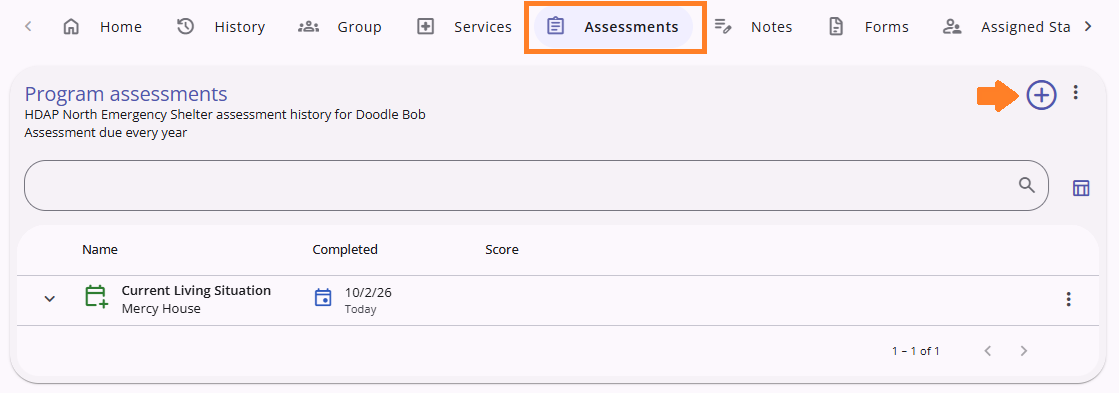
- Click the on the program name to open/view the HDAP program enrollment.
- Click on the assessments tab under the Head of Household's HDAP enrollment.
- Select the add (+) button to open the assessment options panel.
- Select the HDAP Placement Assessment, complete the assessment and save.
-
Status Assessment - This assessment should be completed when any of the following changes: client disability, income source or/and amount and household composition.
-
Annual Assessment - This assessment should be completed for all clients active in a program over 1 year or longer.
-
In accordance with the HUD Data Standards, Annual Assessments are based on the Head of Household's Project Anniversary Date. Annual Assessments for every member of the household are to be conducted within the 30 day window before or after the Head of Household's one year anniversary of their Program Start Date, if they are still active as of one year after their Start Date, regardless of the other household member's Program Start Date.
-
Please review the Status and Annual Assessments for additional details.
Services by Project Types
Below are the different service categories that should be collected in HMIS for HDAP. All services should be provided to the Head of Household.
Temporary, permanent, and other housing costs should be tracked in HMIS. A description of each housing cost is included below.
Emergency Shelter Only
- Temporary housing (track cost): Costs for housing placement that is intended to be short term, such as hotels/motels and shelter.
Rapid Re Housing Only
- Permanent housing (track cost): Costs for housing placement that is meant to be long term. Typically there is a written agreement (e.g. lease, written tenant protections). Permanent housing may be subsidized or unsubsidized and does not necessarily need to be funded by HDAP/HDAP match dollar. Example of permanent housing include: Client moves into a home with HDAP rental subsidy; client moves into a home paid for through a combination of voucher and HDAP funds; client moves in with a family member with a written agreement in place and no HDAP funds assisted with the housing; or client moves into a board and care facility.
All Project Types
- Other housing (track cost): Housing costs that are not temporary or permanent housing payments. This includes housing-related assistance such as application fees, security deposits, utilities, making the home habitable (e.g. furniture), and minor repairs.
Four benefits are tracked in HMIS for HDAP: SSI, SSDI, Veteran's benefits, and CAPI. Each of these benefits is a service category in HMIS, and the following services should be tracked under each benefit for all project types.
- Initial application: The first step/application submitted for this benefit. The client may have applied previously but may be revising or submitting a new initial application due to a change in circumstances.
- Reconsideration: If an applicant disagrees with the initial denial made by the benefit authority (e.g. Social Security Administration), they may request a number of appeals, the first of which is a reconsideration. A reconsideration is a complete review of a claim by someone who did not take part in the first decision. All evidence will be reassessed in addition to any new evidence. Not all benefit types have a reconsideration process; some may only have an initial application and then appeal.
- Appeal: When a client’s application for a desired benefit program has been denied and the client disagrees with the decision, they may request another level of review. There may be several levels of appeal for a disability benefit. For a full description of the Supplemental Security Income application and appeals processes, refer to the Social Security Administration (SSA) application process and the SSA appeals process.
- Approval: Client has been approved for benefits by the benefit authority (e.g. Social Security Administration).
- Denial: The benefit application has been denied by the benefit authority (e.g. Social Security Administration) and either the applicant chooses not to continue the appeal process or all appeals have been exhausted.
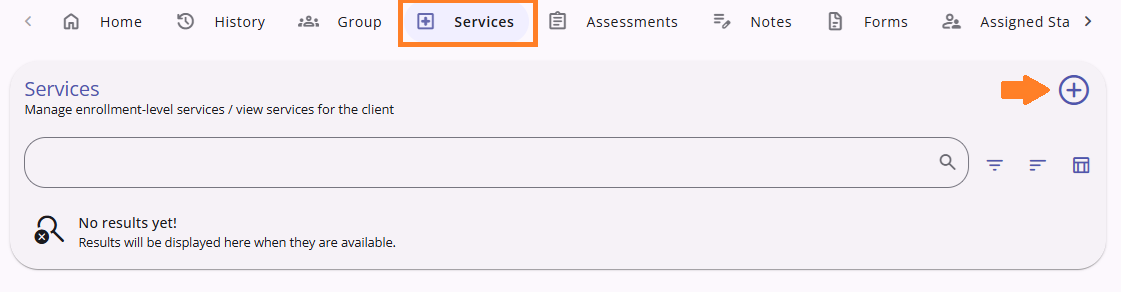
To access these services in HMIS, please follow the steps below.
Navigate to the Services tab under the Head of Household's HDAP enrollment.
- Select the category of available services you would like to enter.
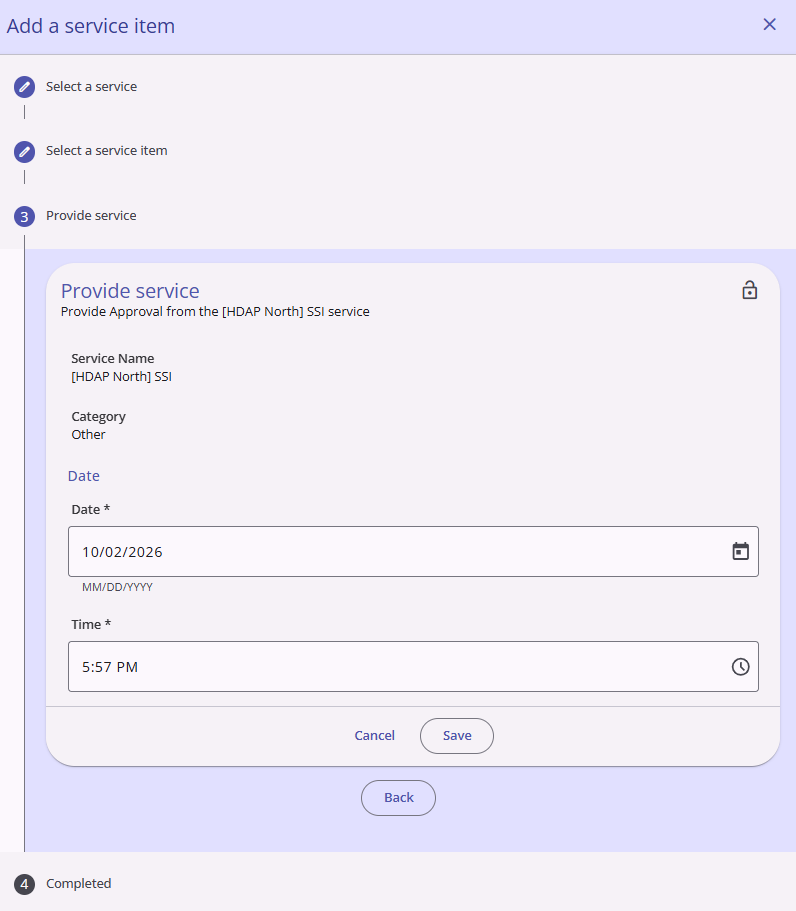
- Next, select the service item that you would like to enter.
- Under Provide Service enter the Start Date and time of the service. If applicable, enter the cost of the service.
- Select the save button to complete the service entry
HDAP Exit Question
THE HDAP exit question is answered on the exit screen at the time a client is exited from the project. This question is completed by all clients. If you have questions about the exit process, please review the Exiting Clients from a Project article. In addition to the standard HUD fields, the question below is also required.
- Exit due to loss of contact
Reports
Reports listed below are available to run under the HDAP section of the Orange County Clarity System Reports on the Data Analysis tab. Please review the Running a Saved Look knowledge base article for more information.
HDAP - Monthly Blue Report: Aggregate overview of the HDAP project over the previous complete month. The dashboard defaults to the previous complete month.
HDAP Disability Details Report: Client-level data related to the disability information included in the Monthly Blue Report.
HDAP Enrollment Details Report: Client-level data related to the Enrollment data entered for HDAP participants.
HDAP Housing Expenses Details Report: Client-level data related to Housing Expenses entered for HDAP participants.
HDAP Housing Placement Details Report: Client-level data related to housing placements made for HDAP participants.

